Loose Pages, Bound Notebook, or Notes on a Screen?
Compare loose pages, bound notebooks and screen notes to choose a journaling format that suits your writing habits, collected fragments and preferred filing method.
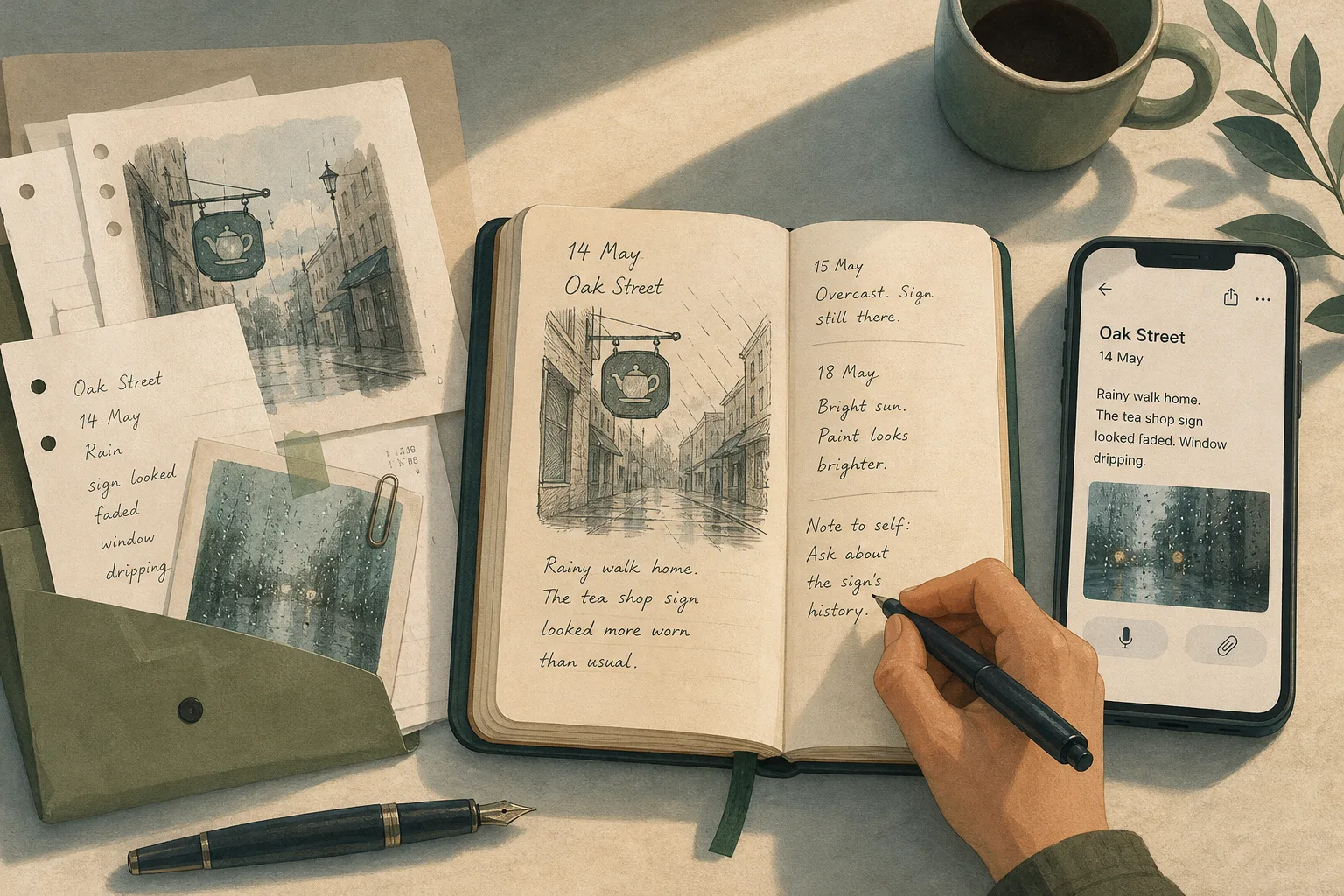
Which journaling format will keep your notes manageable: loose pages, a bound notebook or notes on a screen? The answer depends on what you record and how you prefer to arrange it, especially when sketches or found fragments join the words.
What does each journaling format make easier?
Loose pages can be rearranged and combined with scraps. A bound notebook keeps entries in a fixed sequence. Screen notes can be edited and moved; some apps search typed text, though handwriting, photographs and recordings may need separate titles or transcription.
A sheet can sit beside a map, a notebook offers a continuous surface, and a screen can hold text, images or voice notes if its app supports them. Think of the formats as a tray, a book and a filing drawer: each makes one kind of handling straightforward and another slightly tiresome.
When do loose pages suit a journal?
Loose pages work well when entries grow through additions rather than a fixed sequence. You can place a sketch beside a note, move a draft, or group fragments by subject.
The trade-off is filing. Date or identify each page before storing it in a labelled envelope, ring binder or document wallet. If you add a receipt or sketch, write its connection on the page rather than trusting future memory to supply the missing context.
Paper and writing tools also vary. If you plan to write on both sides, try the paper with your pencil, biro or fountain pen first. If ink shows through more than you like, switch tools or reserve the reverse for brief notes.
What does a bound notebook offer?
A bound notebook keeps entries in a visible sequence and in one place. Turning back through it can make adjacent notes easy to browse without a separate stack to file.
That order cannot be rearranged neatly. If you want to revisit recurring subjects, leave room for an index or later notes; number pages only if you intend to keep the index up to date. Otherwise, the index becomes a small administrative monument.
Binding affects how a notebook handles. A stitched notebook opens differently from a spiral-bound one, and a stiff cover may be useful when you write without a desk. If you often write across a spread, check whether the centre is comfortable to reach.
When do screen notes help you organise material?
Some notes apps search typed words, titles or tags. The result depends on the app and its settings; handwriting, images and voice recordings may not be searchable unless the software recognises or transcribes them. Use a distinctive title such as “Rain on the bus window” rather than “Tuesday” if you want a clearer search clue.
Keep tags few enough to maintain. Several labels that mean nearly the same thing can make filing more work than writing.
Digital notes depend on the device, app and account holding them. Before relying on export or backup, check the current help pages and settings for your particular service: available formats, account requirements and restore options vary. If an export is offered, open a sample file in another suitable app and confirm that its text and attachments appear as expected. For sensitive records or particular data-protection needs, review the service’s terms and settings and seek advice from a qualified professional where appropriate.
How do the formats differ in daily use?
A phone may be close at hand but awkward for a long entry. Typing in public can feel exposed; a notebook needs no battery or signal but is another object to carry. Loose sheets are light individually and less obliging as a travelling pile.
Say you notice the same hand-painted sign on your walk home and want to compare its appearance in different weather. In this invented situation, your starting material is one blank pocket notebook, one phone notes app and two sheets of loose paper; you have no earlier note about the sign. First, in the notebook, write the street name, date and a quick sketch; the observable result is a contextualised entry in sequence, and the trade-off is that it cannot be moved into a subject group. Next, in the phone app, create a note titled with the street name and add the date; the result is an editable record, and you can decide to use it only if the app’s search covers its text. Finally, label each loose sheet with the street name and date, then file them together; the result is material that can be rearranged while retaining its context. If you expect to compare the separate observations together, the loose pages offer the simplest grouping; if you prefer a continuous record, the notebook does; if editing and text search matter, the phone note may suit, subject to the app’s capabilities.
How should you choose a journaling format?
Start with the kind of upkeep you are willing to do. For each point below, the observation leads to a choice and an alternative if that choice does not suit.
- Check what you add: If sketches, tickets or printed fragments often join entries and you can file them, choose loose pages; if filing is unlikely, attach each item to a dated notebook page or add a labelled image to a digital note.
- Check whether sequence matters: If you want entries to remain in order, choose a bound notebook; if you need to group and regroup by subject, choose loose pages or digital folders instead.
- Check what you need to search: If you look for phrases you have typed and the app searches note text, choose screen notes; if you mainly keep images or handwriting, add searchable titles or maintain a dated paper index.
- Check where you write: If you often lack a reliable surface or power, choose a notebook; if its size makes carrying it inconvenient, use a smaller paper format or brief screen notes.
- Check how you revise: If you regularly edit wording or move entries, choose screen notes or loose pages; if revision distracts you from keeping a simple sequence, use a bound notebook.
- Check how material stays together: If pages have gone missing or lost their context, choose a bound notebook or one digital home; if you need to keep physical fragments, use a labelled folder or attach them to a dated page.
- Check digital access: If your service offers an export you can open and its attachments remain legible, screen notes may suit your archive; if access depends on an account or app you may not be able to recover, keep a separate accessible copy if available or choose paper.
A mixed method can work when each format has a defined job. For instance, use a phone for brief captures and a notebook for longer entries. Decide how a note moves between them; otherwise, two partial journals can create extra filing without making their contents easier to sort.
What do readers ask about journaling formats?
Can I switch journaling formats later?
Yes. Keep dates and titles consistent, then decide whether older entries will stay where they are or be moved. A clear boundary between formats is usually easier to maintain than making every old page match the new system.
How do I keep loose journal pages in order?
Date each page and store it in a labelled folder, binder or envelope. If you sort by subject, keep the date visible so you can still reconstruct the sequence.
Should I handwrite or type journal entries?
Choose the method that lets you record an entry without unnecessary resistance. Handwriting gives you a physical page; typing can make editing easier, and search may help if the app supports it.
How can I find an old journal entry?
Use dates and distinctive titles as clues. For paper, an index can point to a page; for screen notes, searchable words or a small set of tags can help, provided the app searches the material you have saved.
Which journaling format suits your filing habits?
Each journaling format asks for a different kind of upkeep: loose pages need filing, a notebook resists rearrangement, and screen notes depend on software and access. Choose according to how you prefer to group, handle and retrieve your material; the format is doing its job when its filing demands suit the way you keep a journal.